MD02 · RS-485 sensor
Generic OEM — air temperature & humidity
XY-MD02
Air temperature + relative humidity transmitter. ASCII protocol on the bench-tested revision.
The XY-MD02 is an RS-485 air temperature and humidity transmitter reporting air temperature and humidity over RS485 ASCII/common protocol at 9600 bps, 8N1, on DC 5–30 V. This guide documents 2 data fields; addressing: N/A — fixed-ID ASCII revision (see notes). Sankhya firmware profile: XY_MD02_ASCII_READ.
Air temperature and humidity prove the platform is not soil-only
The bench-tested XY-MD02 revision does not answer Modbus requests. Sankhya Farms supports it with the separate XY_MD02_ASCII_READ profile: the node switches to 9600 8N1, sends the four-byte ASCII command READ, parses the returned temperature and relative humidity text, and uploads both values to the free cloud dashboard. It can coexist physically with Modbus sensors because the node changes baud and protocol between polls.
This ambient transmitter extends the same monitoring system to a greenhouse, hydroponic grow room, grow tent, mushroom room, propagation area, produce store, equipment enclosure, workshop, animal shelter or ordinary indoor environment. A home gardener may use it to compare canopy conditions with root-zone moisture, while a larger installation can watch several rooms or zones. It observes the surrounding air, not pH or EC in a nutrient reservoir. No soil use case is required, and no control output is required: Sankhya can simply retain a temperature-and-humidity history from a 5–30 V RS-485 device.
Check the physical label before applying power
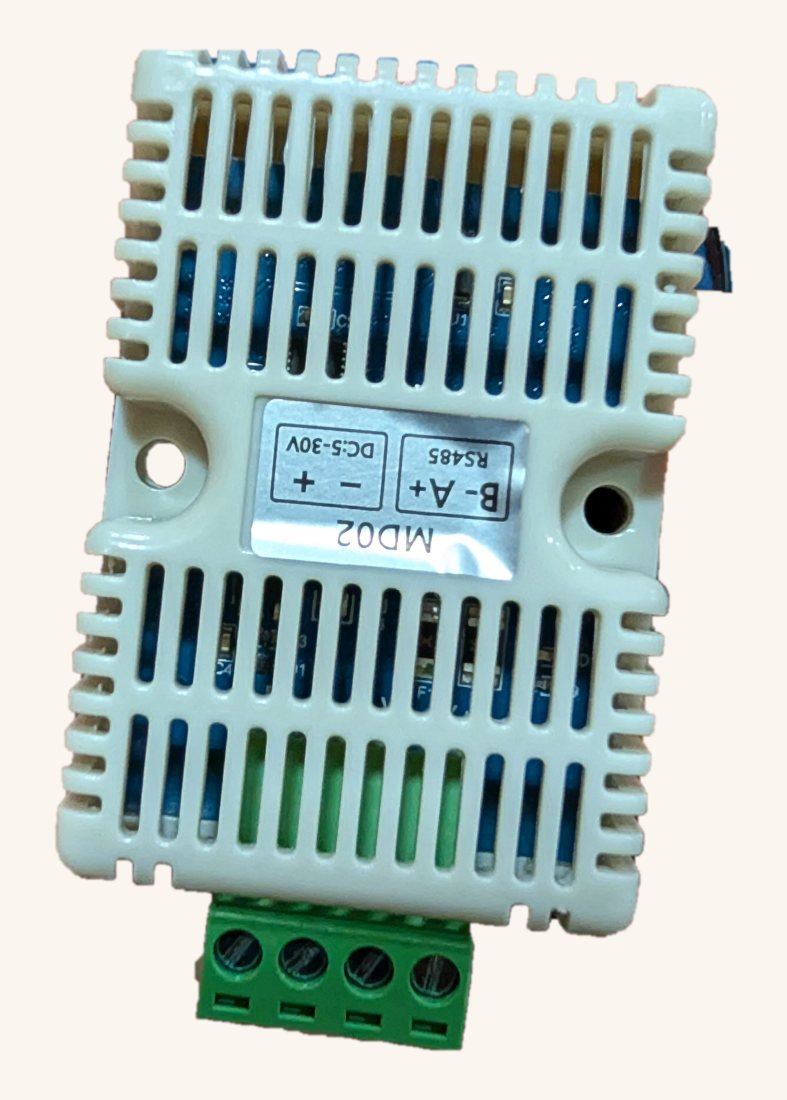
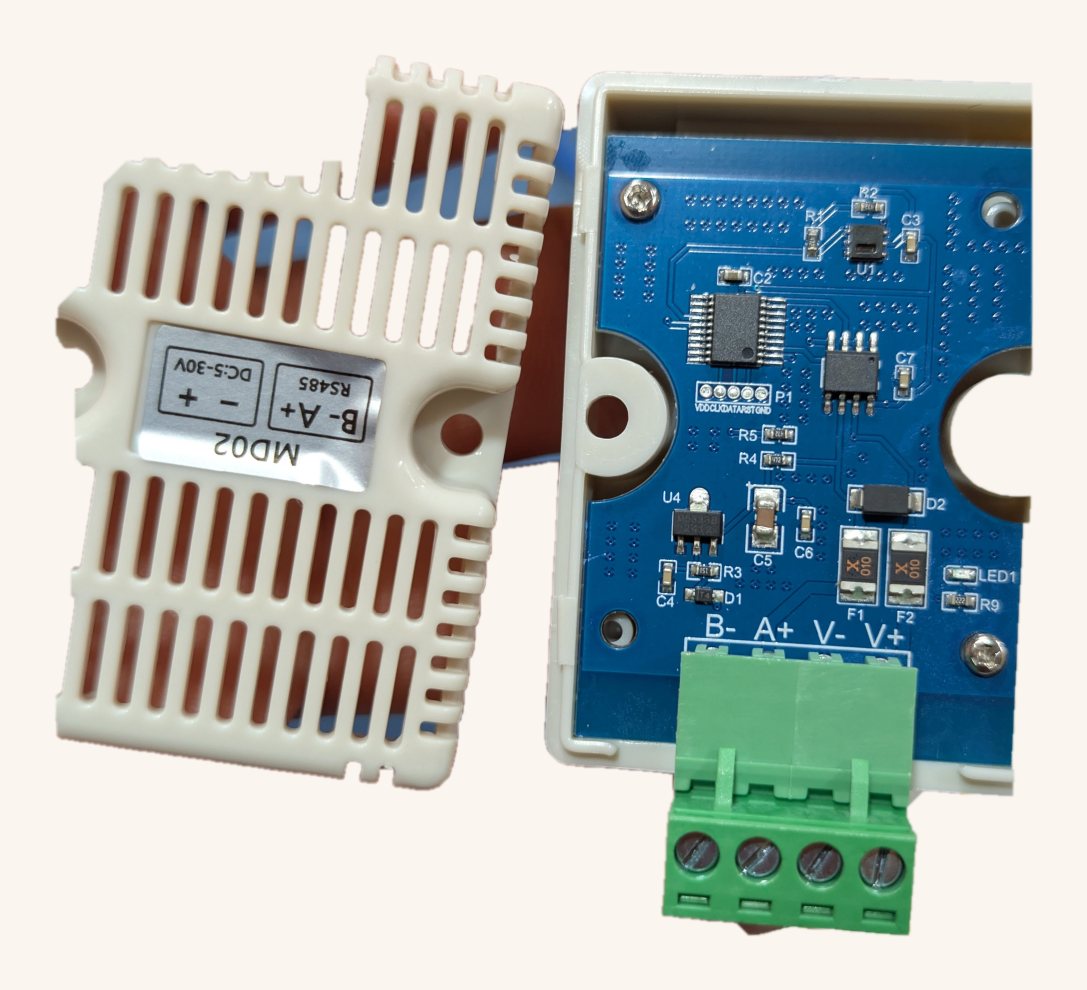
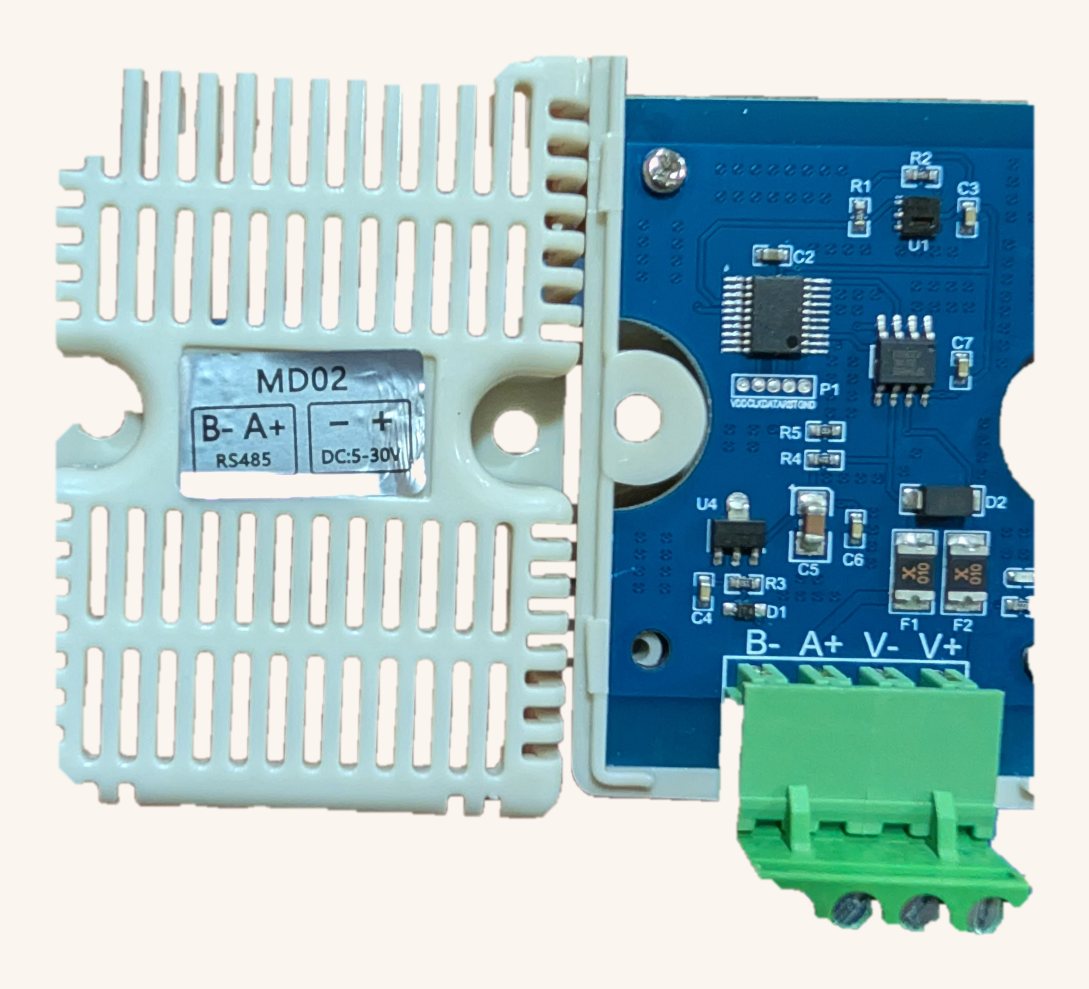
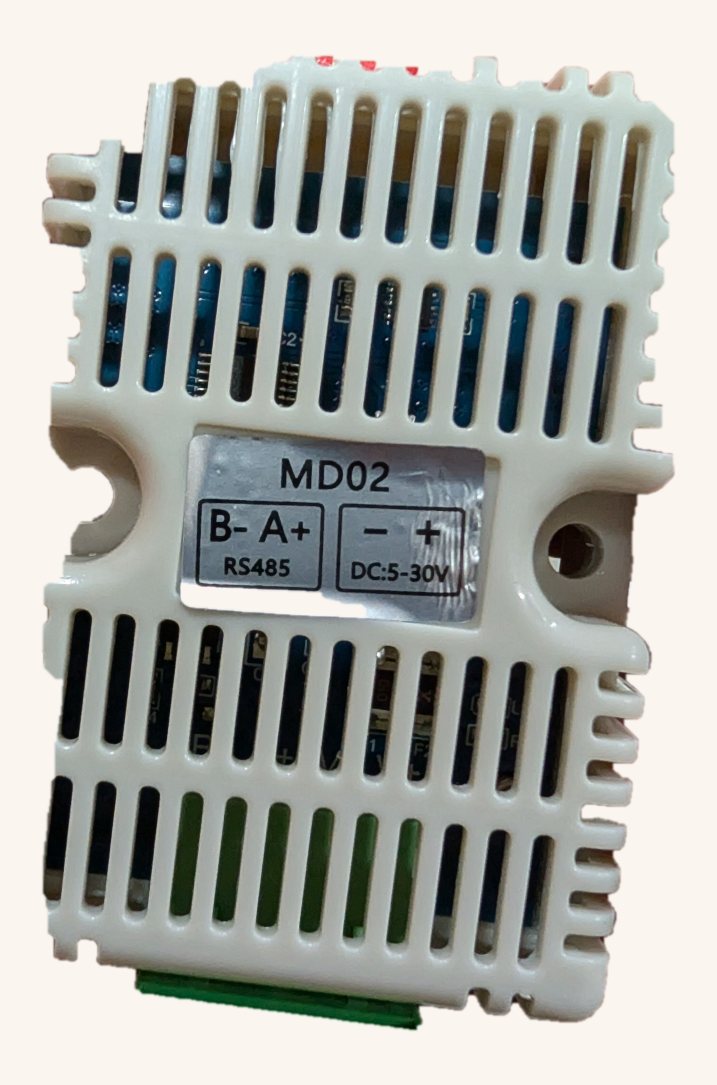
The tested unit arrived with its adhesive label rotated relative to the PCB silkscreen, swapping the apparent power and data pairs. Follow the corrected photographs and continuity checks on this page rather than trusting an unverified sticker.
How do I request a value from this XY-MD02 revision?
There is no holding-register address to look up on the tested device. Send the literal ASCII bytes for READ at 9600 8N1 and parse the returned text. On the bench the response was 16.02C,55.85%, which directly represents 16.02 °C and 55.85% relative humidity. A Modbus CRC frame or an XY-MD02 register map found for another revision will not work with this one. Sankhya chooses the ASCII parser by sensor profile.
- Why does a Modbus scanner find nothing?
- The tested revision uses a fixed ASCII command rather than Modbus-RTU. “RS-485” identifies the electrical layer, not necessarily the application protocol.
- Can Sankhya support other non-soil RS-485 devices?
- Yes, when their voltage, wiring and protocol are documented and a profile is added. Air quality, water quality, flow, pressure, level and weather instruments are all plausible RS-485 categories; they are not automatically supported merely because they use 12 V.
Bus & electrical specs
Specs sourced from: XY-MD01/MD02 family datasheet + Sankhya v4 node bench test.
This unit speaks ASCII, not Modbus
The revision Sankhya bench-tested is not a Modbus-RTU slave. A full Modbus scan (6 baud rates, 8N1/8E1/8O1, function codes 0x03/0x04, several register starts) returned zero valid responses. Instead it answers a bare four-byte ASCII command with a plain-text string — no CRC, no register map.
Response format <temperature>C,<relative_humidity>%, parsed with ^(-?\d+(?:\.\d+)?)C,(\d+(?:\.\d+)?)%$:
| Field | Type | Unit | Capture |
|---|---|---|---|
| air_temperature | float | °C | group 1 |
| relative_humidity | float | %RH | group 2 |
Factory label is upside-down
The printed sticker contradicts the PCB silkscreen
On the XY-MD02 units we received, the adhesive label on the vented cap is rotated 180° relative to the board's own silkscreen. Wire by the sticker as printed and you swap the RS-485 data pair with the power pair — feeding DC into the data lines and the bus signal into the supply pins. Best case the sensor never answers; worst case you damage it.
The PCB silkscreen is the authority. Open the cap once and confirm against the board. Looking at the terminal block with the four screws toward you, the correct order is:
Either re-apply the label the right way up (steps below) or ignore the sticker entirely and wire to the silkscreen. The data terminals are marked B− / A+ — pair them to your bus B / A respectively.
The problem · what's wrong
The fix · how to correct it
Documented from physical units, Sankhya field bench, June 2026. Your unit's revision may differ — always verify against its own silkscreen.
Notes & caveats
Directly confirmed on a Sankhya v4 node. The bare four-byte ASCII command READ at 9600 8N1 returned 16.02C,55.85%. This exact revision should use XY_MD02_ASCII_READ, not a Modbus register-map profile. It can coexist with 4800-baud Modbus sensors on the same physical RS485 bus by switching UART baud/protocol between polls.
Common questions
- What baud rate does the XY-MD02 use by default?
- 9600 bps, 8N1. It is an ASCII device, not Modbus.
- What supply voltage does the XY-MD02 need?
- DC 5–30 V (< 0.2 W).
- Is the XY-MD02 compatible with the Sankhya platform?
- Yes — it is in the Sankhya RS-485 sensor library and the firmware-generation pipeline can produce node firmware for it.
- What data fields does the XY-MD02 return?
- It uses RS485 ASCII/common protocol rather than Modbus register reads. This guide documents 2 data fields parsed from the reply frame. Documented entries include air_temperature and relative_humidity.
Run this sensor on a Sankhya node
Every sensor on this page is in our RS-485 library. Pick your model, and the firmware-generation pipeline builds the Modbus (or ASCII) polling code for an ESP32-S3 node — no hand-coding the register math.
Contact Us